
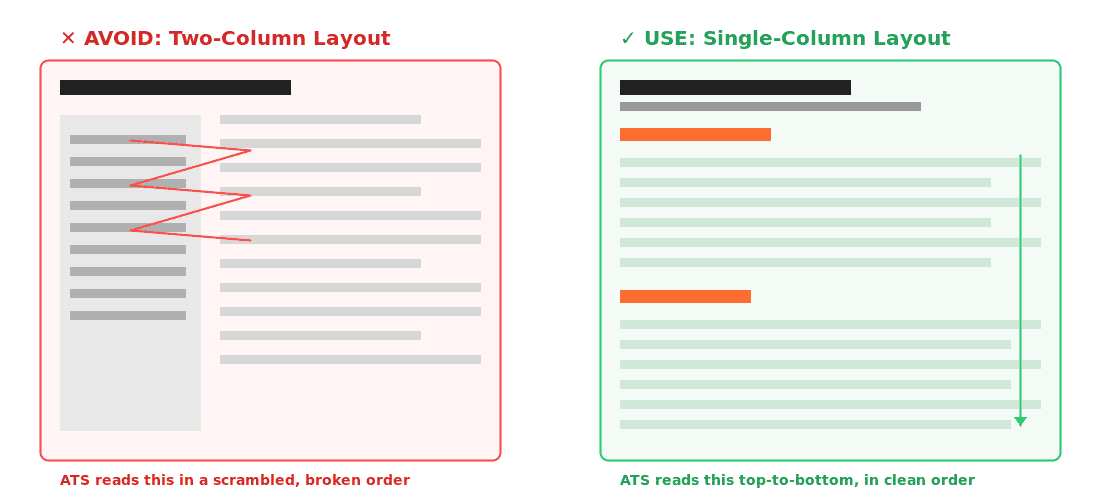
A resume with two-column layout and a creative font template will get rejected by an ATS before a human recruiter ever opens it — even if the candidate is a 9/10 fit for the role. Workday, Greenhouse, and Lever (the three ATS platforms used by most IT companies hiring in India today) parse resumes into structured fields, and anything they can't parse correctly either gets dropped or scrambled into unreadable text. The fix isn't complicated, but it requires unlearning almost everything candidates think makes a resume look "designed."
Here are the nine changes that move a resume from invisible to interview-ready.
Step 1: Kill the Two-Column Layout and Text Boxes
Most ATS platforms read resumes left to right, top to bottom, in a single linear stream. A two-column layout — skills sidebar on the left, experience on the right — gets read out of order. The parser might output "Python JavaScript SQL Senior Developer at TCS 2019" as one garbled string, with your actual job title lost in the middle.
Before: A resume with a left sidebar (Skills, Education, Certifications) and a right main column (Experience, Summary), built in a Canva or Word template with text boxes.
After: A single-column resume where every section — Summary, Skills, Experience, Education, Certifications — flows top to bottom in one stream, built with native Word paragraph and heading styles, no text boxes, no tables, no columns.
Action: Open your resume in Word. If you used "Insert > Text Box" or a multi-column template anywhere, rebuild the section using plain paragraph formatting instead.
(Banner illustration attached below shows this side-by-side — scrambled reading order on two-column vs. clean order on single-column.)
Step 2: Save as .docx, Not PDF (Usually)
This contradicts what most candidates assume. PDFs preserve visual formatting perfectly for a human reader, but older ATS parsers — and a meaningful share of Indian companies still run on Taleo, iCIMS, or in-house systems built 5–8 years ago — struggle with PDF text extraction, especially when the PDF was exported from a design tool like Canva.
The safe rule: Submit .docx unless the job posting explicitly asks for PDF. If you only have one version, .docx is the higher-compatibility choice for the broadest range of Indian ATS platforms in 2026. If you're applying directly on a company career page that auto-uploads to Workday or Greenhouse, both handle PDF and .docx equally well — so default to .docx for safety and switch to PDF only if a recruiter specifically requests it for a human read.
Step 3: Mirror the Exact Job Title and Keywords from the JD
ATS keyword matching is not semantic. It does not know that "Frontend Engineer" and "UI Developer" are functionally the same role. If the job description says "Senior Java Developer" and your resume says "Senior Software Engineer (Java)," you may score lower on keyword match even though you're describing identical work.
Before: Resume headline reads "Software Engineer II" because that was your internal title at Infosys.
After: Resume headline reads "Senior Java Developer" — matching the job posting's exact language — with "(Software Engineer II at Infosys)" noted underneath if you want to preserve accuracy.
Action: Before submitting, read the job description twice and highlight every technical term, tool name, and certification mentioned. Make sure each one appears in your resume in the same phrasing, provided it's truthful to your actual experience.
Step 4: Use Standard Section Headers — Not Creative Ones
ATS platforms are trained to recognize standard section headers: "Work Experience," "Education," "Skills," "Certifications." If you rename "Work Experience" to "My Journey" or "Where I've Been," the parser may fail to categorize that section at all, meaning none of the content under it gets matched against the job requirements.
Before: "The Journey So Far," "What I Bring to the Table," "Tools of the Trade"
After: "Professional Experience," "Technical Skills," "Education," "Certifications"
This isn't about being boring — your bullet content can still be sharp and specific. The headers just need to be machine-readable.
Step 5: Spell Out Every Acronym at Least Once
A recruiter searching the ATS database might search "Customer Relationship Management" while your resume only says "CRM" — or vice versa. Indian tech resumes are particularly acronym-heavy (CI/CD, SDLC, UAT, POC, SOW), and inconsistent expansion costs you matches.
Before: "Built CI/CD pipelines using Jenkins, integrated with K8s clusters on AWS EKS."
After: "Built Continuous Integration/Continuous Deployment (CI/CD) pipelines using Jenkins, integrated with Kubernetes (K8s) clusters on AWS Elastic Kubernetes Service (EKS)."
Action: Go through your resume and spell out the full term the first time any acronym appears, with the acronym in parentheses. After that, you can use the acronym alone.
Step 6: Quantify Every Bullet — Numbers Are Keyword Gold and Human Gold
This step helps with both ATS scoring and human reviewer impact, which is rare — most ATS fixes are purely mechanical. Numbers don't just make a bullet more credible; on some scoring models, quantified achievements (% improvement, ₹ value, team size, scale of users) are weighted as stronger signal than vague verbs.
Before: "Worked on improving the performance of backend APIs and reduced load time."
After: "Reduced API response time by 42% (1.2s to 0.7s average) across 14 microservices serving 80,000+ daily active users, by introducing Redis caching and query optimization."
Before: "Led a team and delivered projects on time."
After: "Led a team of 6 engineers across 3 sprints to deliver a payments reconciliation module 2 weeks ahead of schedule, reducing manual reconciliation effort by 30 hours/month."
Action: Go bullet by bullet. If a bullet has no number — percentage, rupee amount, team size, time saved, user count — ask whether you can reasonably estimate or recall one. If you genuinely cannot quantify it, that's a signal the bullet may not be strong enough to include.
Step 7: Match File Naming and Contact Formatting Conventions
Small details break parsers in ways candidates don't expect. A resume named "Resume_Final_V3_USE_THIS_ONE.docx" looks unprofessional when downloaded by a recruiter, and some ATS systems use file names in candidate record creation. Phone numbers with unusual formatting ("+91-98XXX-XXXXX (call after 6pm)") can fail to parse into the phone field correctly.
Before: File name: "CV_updated_final2.docx" · Contact line: "Mob: 98xxxxxxx (only WhatsApp, prefer email)"
After: File name: "Arjun_Mehta_Senior_Java_Developer.docx" · Contact line: "Arjun Mehta | +91 98XXX XXXXX | arjun.mehta@email.com | Bangalore, India | linkedin.com/in/arjunmehta"
Action: Rename your file to FirstName_LastName_TargetRole.docx. Put a single clean contact line at the top with name, phone, email, city, and LinkedIn URL — no extra commentary.
Step 8: Avoid Headers, Footers, and Embedded Tables for Critical Information
Many ATS parsers skip header and footer regions entirely, since that's where company logos and page numbers traditionally live. If your contact information or current job title is placed in a header, it may simply not get captured by the system.
Before: Name and contact details placed in the document header (visible at the top of every page in Word's header zone), with the main resume body starting below.
After: Name and contact details as the first line of the actual document body — not in a header/footer field — followed by the rest of the resume content in normal body flow.
Action: In Word, click into your resume content. If your name and contact line are inside a double-click-to-edit header area, cut that text and paste it as a normal paragraph at the very top of the body.
Step 9: Test Your Resume Before You Submit It
The fastest way to know if your resume parses correctly is to convert it back to plain text and read what the machine actually sees.
Action: Open your .docx file, select all (Ctrl+A), copy, and paste it into a plain text editor like Notepad. If your skills, job titles, dates, and company names appear in a logical, readable order with no garbled text or missing sections, your formatting is ATS-safe. If you see jumbled text, columns merged into nonsense strings, or missing chunks of content, that's exactly what the parser is seeing — go back and fix the formatting issue causing it.
Several free ATS resume checker tools (Jobscan, ResumeWorded) will also score your resume against a specific job description and flag missing keywords, though for IT roles in India, manually cross-checking against the JD using Steps 3 and 5 above is usually sufficient.
A Quick Pre-Submission Checklist
Before you send your resume for any tech role in 2026, confirm:
Single-column layout with no text boxes or tables for core content. File saved as .docx (or PDF only if explicitly requested). Job title and key terms mirror the job description's exact language. Standard section headers throughout. All acronyms spelled out at first use. Every bullet contains at least one number. File named FirstName_LastName_Role.docx. Contact details in the document body, not header/footer. Resume tested by pasting into plain text to confirm clean parsing.
Frequently Asked Questions
Do all companies in India use an ATS to screen resumes?
Most mid-size and large IT companies and recruitment agencies do, including TCS, Infosys, Wipro, and the majority of GCCs (Global Capability Centres) operating in India. Startups with under 50 employees sometimes screen resumes manually, but the volume of applications even small companies receive on platforms like Naukri and LinkedIn means ATS-style keyword filtering is increasingly common at every company size.
Will using an ATS-friendly format make my resume look boring?
No — ATS-friendliness governs structure (single column, standard headers, no text boxes), not content quality. You can still write sharp, specific, achievement-driven bullets within a single-column format. The strongest resumes in 2026 are both ATS-compliant and compelling to a human reader; the two goals aren't in conflict.
Should I use the same resume for every job application?
No. Keyword matching works best when your resume's terminology mirrors each specific job description. Keep one strong master resume, then spend 10–15 minutes adjusting the headline, summary, and top skills section to mirror each job posting's specific language before submitting.
Do ATS systems reject resumes with photos or graphics?
Photos don't typically cause rejection, but they add no parsing value and increase file complexity. For the Indian market specifically, omitting a photo is now standard practice for tech roles — most ATS-optimized templates exclude it entirely, and some companies' diversity hiring policies discourage photos in early screening stages.
How many pages should a tech resume be?
One page for candidates with under 5 years of experience; up to two pages for 5+ years. ATS systems don't penalize length directly, but recruiters reviewing the shortlisted output do — a bloated resume signals poor prioritization regardless of how well it parses.
Can I use a resume template from Canva or a free online builder?
Most Canva and free-builder templates use design elements — icons, columns, colored sidebars, text boxes — that are exactly what breaks ATS parsing. If you want a visually distinctive resume for networking or LinkedIn, keep that as a separate version, and use a plain, single-column Word document for every actual ATS-screened application.
Need a second opinion on your resume before you apply? Browse current openings on our careers portal or connect with our IT recruitment team to understand what specific roles are looking for.